Micro PE Toolbox Lv Liaoliao Modified Version Updated!
WePE Toolbox - Lvlele’s Modified Version (Updated!)
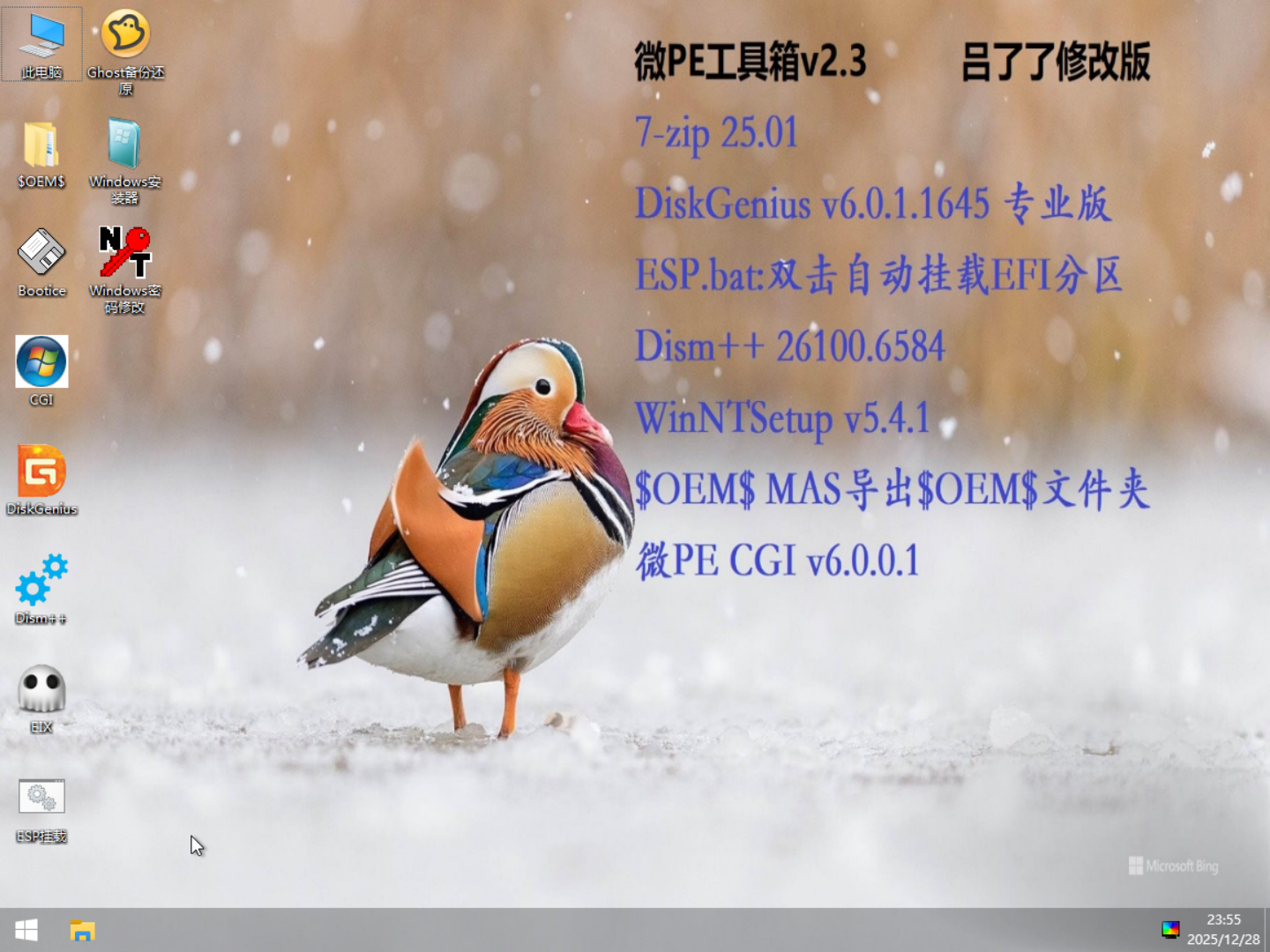
Included Software & Major Updates in Lvlele’s Modified WePE Toolbox
- 7-zip (Latest v25.01)
- DiskGenius v6.0.1.1645 Professional Edition (Genuine Crack)
- ESP.bat: Double-click to auto-mount EFI (ESP) partition
- Dism++: Updated internal DISM version to 26100.6584 (2025 update)
- WinNTSetup: Updated to v5.4.1
- $OEM$: Places the MAS-exported $OEM$ folder on the desktop (for auto-activation)
- WePE CGI v6.0.0.1
- Everything
- GhostCGI
- Image Viewer
- MEMTEST (Memory Diagnostic Tool)
- orderdrv (Drive Letter Organizer)
- BOOTICE.exe
- cpuz.exe (Hardware Resource Viewer)
- EIX.exe (Easy Image X: System Installation Tool by IT Sky)
- GoHash.EXE (File Hash Calculator)
- mouse.exe (Keyboard-controlled mouse tool written in AHK)
- SETPAGEFILE.EXE (System Paging File Configuration Tool)
- WinosInfo.exe (System resource display on desktop)
- password.exe (Windows Password Changer)
- Wimtool (WIM file manipulation tool)
Detailed Information
WePE Toolbox Version: v2.3.1 (Original installer exe: 227MB)
Lvlele’s Modified WePE Toolbox File Sizes:
lvlele_WEPE_v2.3.1.isoSize: 287MB- MD5: a5594026c7781d282798a3050b9eb1ff
WEPE64.WIMSize: 280MB- MD5: a275705d4690723af6dd87258c53a894
PE System Wallpaper Path:
- WEPE64.WIM\Windows\Web\Wallpaper\Windows\img0.jpg
- Can be replaced with any image named
img0.jpg
Replacement Method
Open
WEPE64.WIMwith 7-Zip, navigate to the wallpaper path above, and delete the originalimg0.jpg.Drag your new
img0.jpginto the 7-Zip window to replace the file.
PE Installation Methods
Method 1
Direct WIM File Replacement (Fast, No USB Drive Formatting Required)
- Create a bootable USB drive using WePE Toolbox v2.3 (https://www.wepe.com.cn/download.html)
- In File Explorer, open the EFI partition of the USB drive and navigate to
\EFI\WEPE\ - Replace the existing
WEPE64.WIMwith the one I provided - Done
Method 2
Create a Bootable USB Drive Using a Boot Disk Tool
- Download the Boot Disk Creation Tool
- Insert your USB drive and select it in the tool
- Configure the settings as shown in the image below:
- EFI partition size: 1024MB is sufficient
- Small USB drives: use exFAT format for the data partition; large USB drives, SSD USB drives, or SSDs: use NTFS
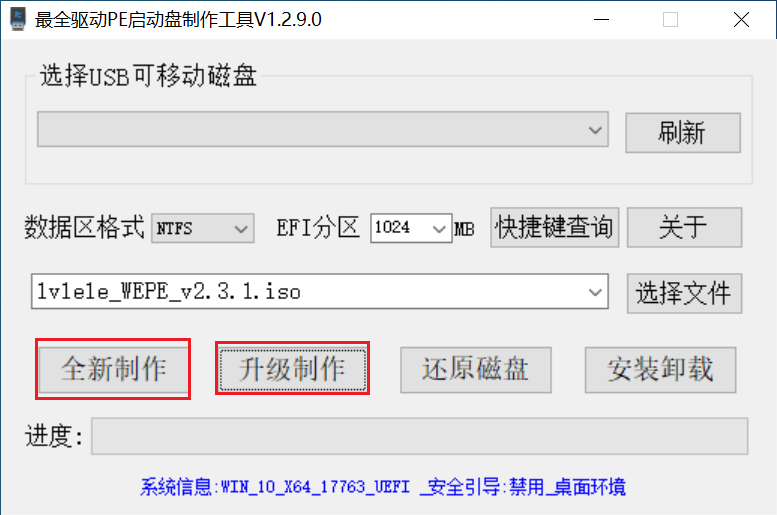
- “Select File”: Choose
lvlele_WEPE_v2.3.1.iso - Depending on whether your USB drive is already a bootable drive, click “New Creation” or “Upgrade” (New Creation is recommended)
- The new creation process will format the USB drive
- Wait for the process to finish
Download Lvlele’s Modified WePE Toolbox
Follow me and reply with “wepe” in the official account’s backend to get the Boot Disk Creation Tool, lvlele_WEPE_v2.3.1.iso, WEPE64.WIM, and PE Software List with no speed limit download links!
Micro PE Toolbox Lv Liaoliao Modified Version Updated!
https://en.lvlele.top/063-wepe-toolbox-modified-update/