Windows System Optimization Tool: Made by a Passionate Expert!
Windows System Optimization Tool: Masterfully Crafted by a 52pojie Forum Expert!
Every time you reinstall the system, having to tweak the desktop UI, adjust File Explorer settings, and customize the taskbar icons one by one is nothing short of a headache. Isn’t there a simple tool that lets us batch-apply all these changes at once?
This Windows optimization tool, masterfully created by a veteran from the 52pojie forum, is the ultimate solution for rapid system optimization.
Download Link:
https://wwkd.lanzn.com/ibSJY2by6w4f
How to Use
Open the Windows Optimization Tool
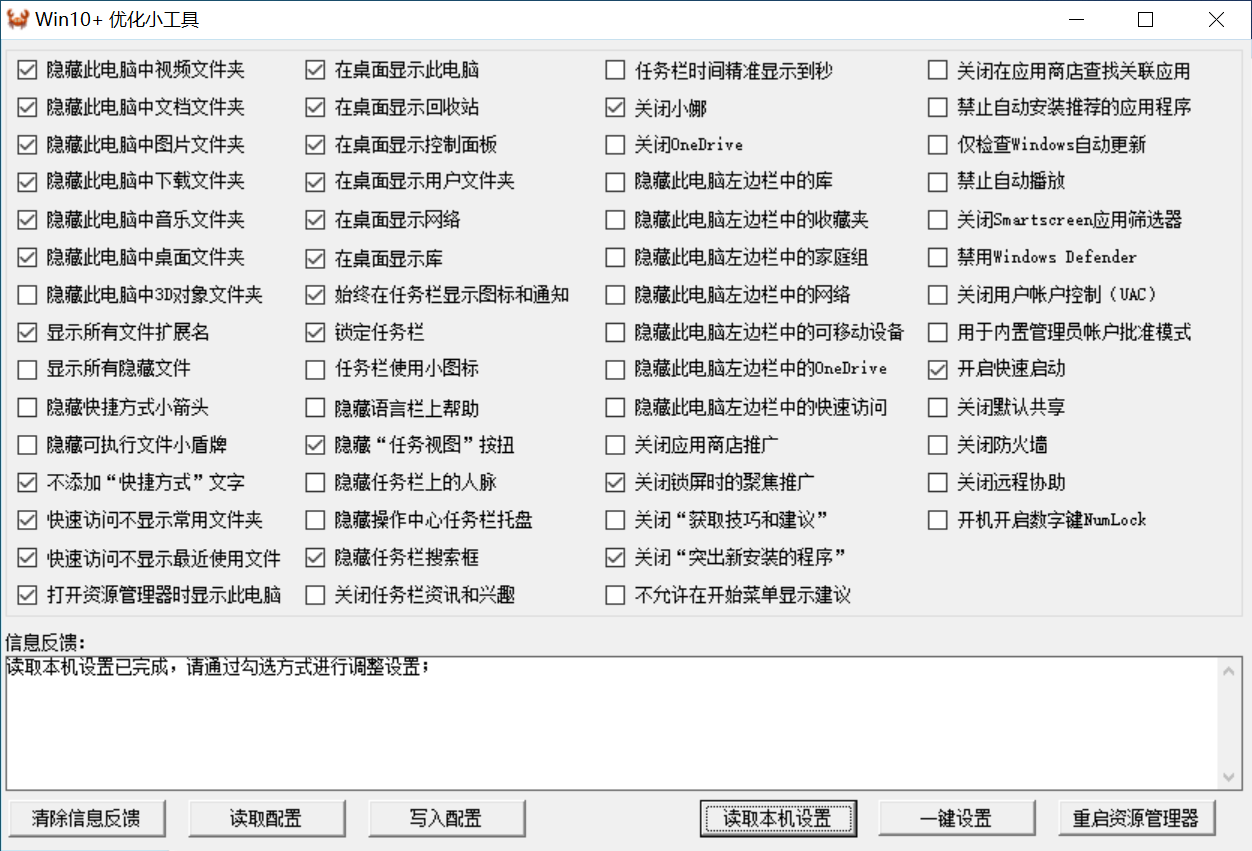
- First, click “Read Local Settings” — the tool will automatically read the current system registry.
- Check the settings you prefer, and the registry will be updated immediately.
Please note: There is no “Save Settings” button. Changes take effect as soon as you check an option. Simply restart File Explorer to apply them.
- Click “Restart File Explorer”
Other Features
- “One-Click Setup” is the lazy mode — the tool automatically applies settings based on common user preferences.
- “Read Config” loads the external configuration file “config.ini”. I’ve included a config file in the archive that I consider well-suited for most users. You can use it directly as needed. (The .ini file can be opened with Notepad to view its contents.)
- “Write Config” saves your current settings to the external config.ini file. This will overwrite the original config.ini, so please make a backup first.
Although this tool is designed for Windows 10, it has been tested and works perfectly on Windows 11 as well.
Windows System Optimization Tool: Made by a Passionate Expert!
https://en.lvlele.top/070-windows-system-optimization-tool/