2026 Global Amazon Cross-Border Shopping Practical Guide to Avoiding Pitfalls
2026 Global Amazon Overseas Shopping: A Comprehensive Guide to Avoiding Pitfalls
Preparation Materials
- Bank of China Great Wall Cross-Border Card (International Debit Card)
- Bank of China Regular Debit Card
- Mainland China mobile phone number
- Any valid email address
- Mobile phone / computer browser
Introduction
Amazon operates in many countries: Amazon China, Amazon US, Amazon UK, Amazon Germany, Amazon France, and so on.
- Accounts for the US, Canada, UK, France, Germany, Italy, Spain, Mexico, Brazil, and India are interchangeable.
- Accounts for China and Japan are closed systems and not connected internationally.
Paid Prime membership benefits (e.g., free shipping, video streaming) are independent per country and not transferable.
You can log in and use all the above Amazon country websites directly from a Chinese network environment.
Getting the Great Wall Cross-Border Card
The Bank of China Great Wall Cross-Border Card is one of the few VISA/Mastercard single-label multi-currency debit cards available in China.
- VISA/Mastercard: Two major international card organizations, essentially the global equivalent of China UnionPay.
- Single-label: Only one card logo (VISA or Mastercard), no UnionPay logo.
- Foreign currency: Currencies other than CNY.
- Debit card: Not a credit card; it functions like a savings account.
The Bank of China Great Wall Cross-Border Card series includes 8 cards:
- Mastercard Standard Gold (BIN: 529774)
- VISA Gold (BIN: 400221)
- Mastercard Platinum (BIN: 538113)
- VISA Platinum (BIN: 400292)
- Mastercard World (Monet Card) (BIN: 533228)
- VISA Winter Olympics Imperial Seal Card (BIN: 400515)
- Mastercard Feirenzai Co-branded Baize Gold Card (BIN: 529774)
- Mastercard Feirenzai Co-branded Xiaoyu Gold Card (BIN: 529774)
All card types have the first year’s annual fee waived.
Recommendation: Mastercard World (Monet Card)
Steps to apply:
- Search for “Bank of China [Your City] branch” in your browser, then call the branch to confirm they have the Great Wall Cross-Border Card in stock.
- Download the China Mobile / China Unicom / China Telecom app (to check the activation date of your real-name registered SIM card).
- Bring your ID card and phone to a physical branch to apply directly.
Initial Configuration of the Great Wall Cross-Border Card
Open the Bank of China mobile banking app, tap “Account Management” near the top right, then tap the Great Wall Cross-Border Card to enter the details page.
Tap “Payment Settings” at the bottom.
Important: Enable the following options one by one: Mobile Payment, Online Payment under Electronic Payment, and Online Payment, Cross-Bank Auto-Debit, Cross-Bank Subscription under Cross-Bank Payment.
Set the daily payment limit to 20,000 CNY.
If not enabled, Amazon payment will fail.
Transferring Funds to the Great Wall Cross-Border Card
You cannot transfer money to the Great Wall Cross-Border Card from other banks’ cards. Only a Bank of China regular debit card (savings card) can be used.
- Ensure your Bank of China regular debit card has sufficient CNY.
- In the Bank of China mobile banking app, tap “More” on the home page, scroll down to find “Foreign Exchange Purchase/Sale.”
- Tap “Purchase Foreign Currency,” wait 30 seconds, then tap “Agree.”
- Select the currency you wish to buy (e.g., GBP).
- For “Cash/Remittance,” select “Cash.”
- Enter the amount of foreign currency you want.
- Set the purpose to “Overseas Shopping.”
- Follow the prompts to complete the transaction.
Note: Converting foreign currency back to CNY requires an in-person visit to a branch. So don’t buy more than necessary to avoid hassle.
The amount you buy should match the price of the item you plan to purchase.
The currency type depends on the currency required for payment.
Registering an Amazon Account
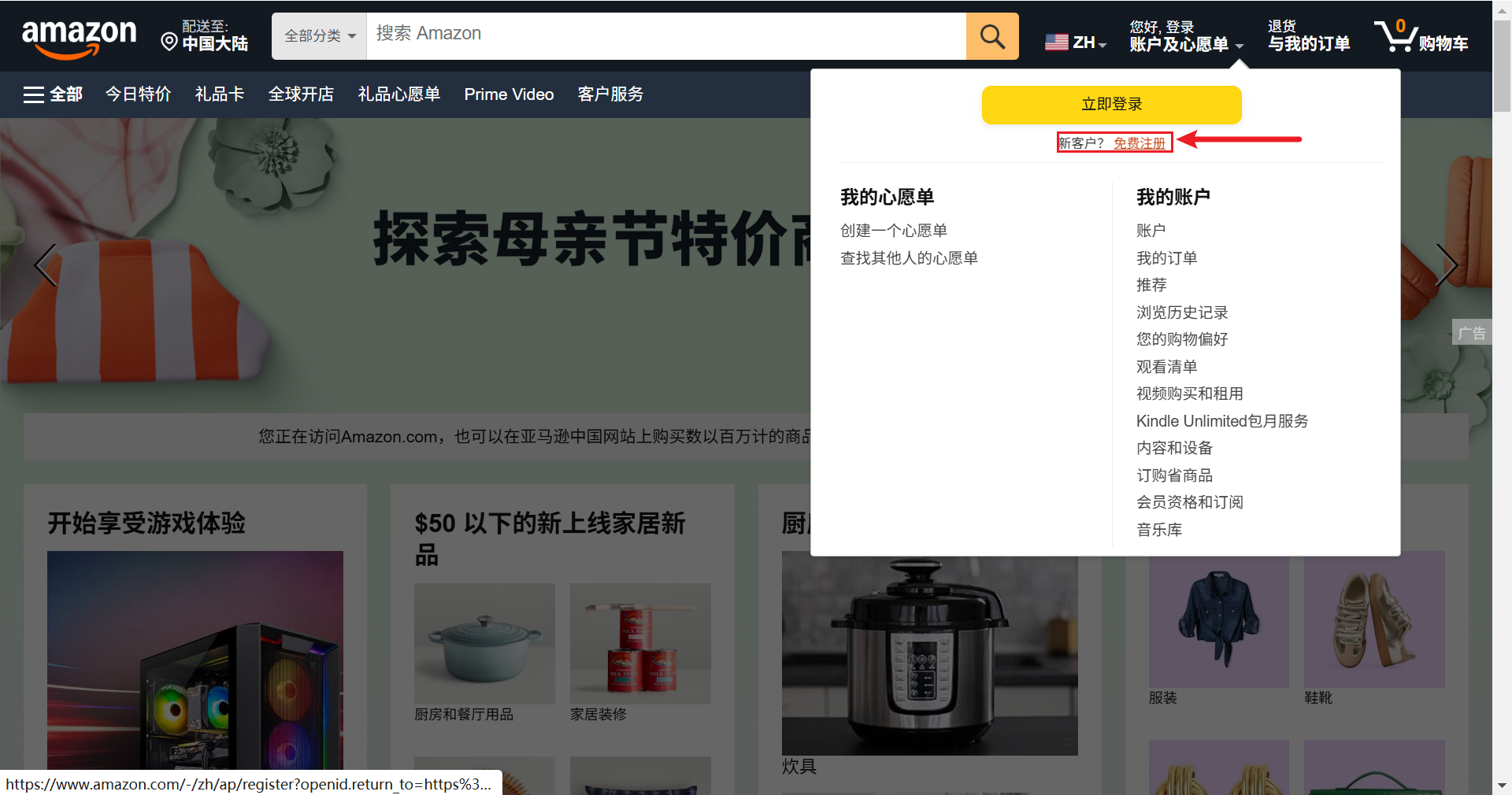
Since this is overseas shopping, you must register for a foreign Amazon account.
Open the Amazon US official website directly in your browser: https://www.amazon.com/
For desktop, use Chrome or Edge; for Android mobile, use Edge or Via.
If the page loads slowly on desktop, try using your phone. But never use a VPN.
Tap “Hello, Sign In” in the top right corner.
Enter your email address and tap “Continue.”
When prompted: “Looks like you’re new to Amazon. Create an account with your email address.” Tap “Continue to create account.”
Fill in your name, set a password, complete the CAPTCHA, and enter the email verification code.
Add your phone number. Select country/region: China (+86) at the top of the list. Enter your number, tap “Next,” and enter the verification code.
In some regions, the verification code may not arrive or may be slow. Try requesting it a few more times or check your spam folder.
If it still doesn’t arrive, try enabling “International Roaming” for free in your China Unicom/China Mobile/China Telecom app.
Registration complete.
Securing Your Amazon Account
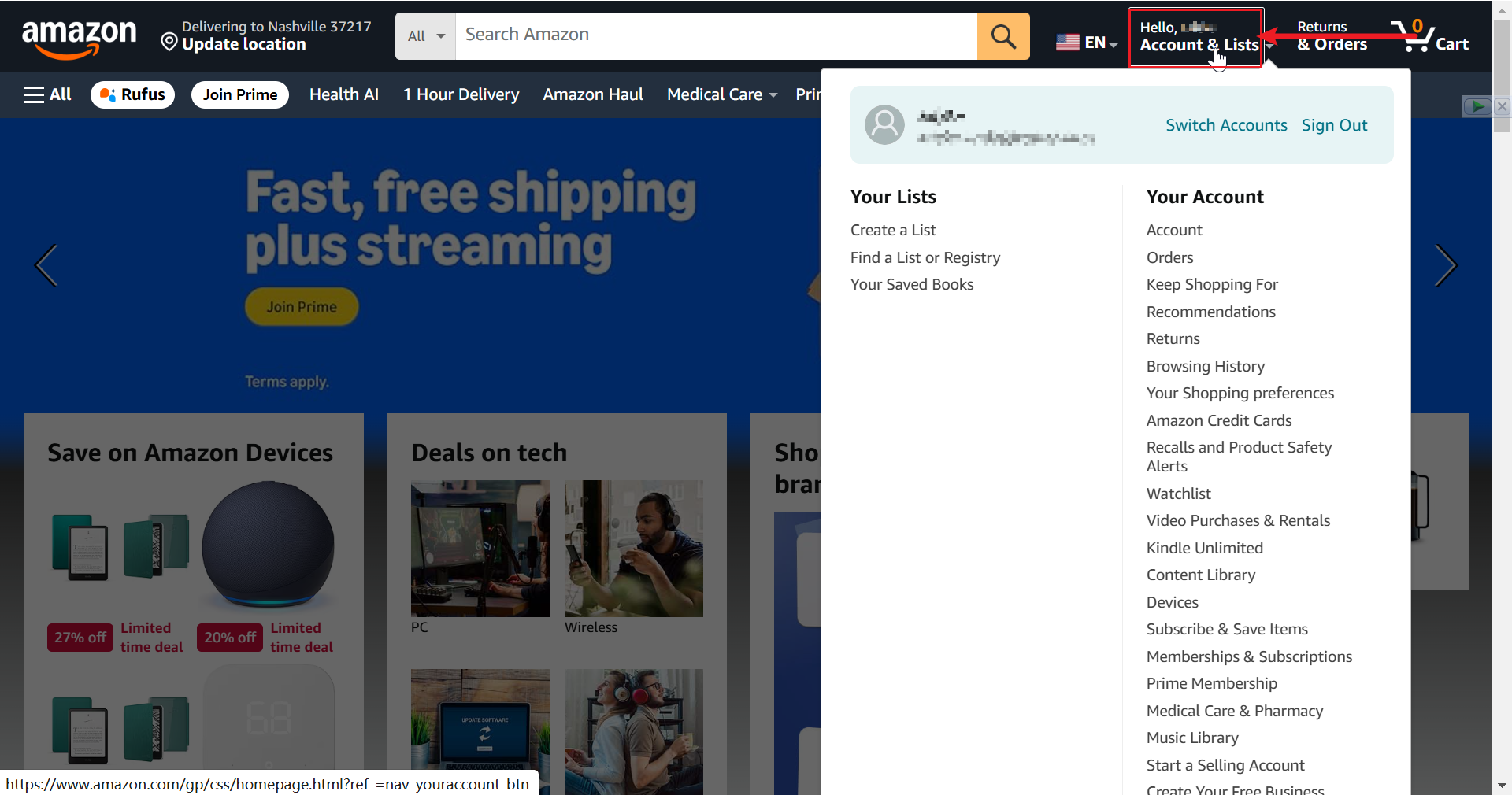
To make your Amazon account more secure, configure your account settings.
Tap “Hello, [Your Name]” in the top right corner to go to your account page.
Tap Login & Security, then enter the email verification code.
Find 2-Step Verification and tap “Turn On” on the right.
It is recommended to Use an authenticator app.
Open your phone, search for and download the Aegis app. This is your two-step verification tool.
Aegis is not available in app stores; download it from the official website.
Official website: https://github.com/beemdevelopment/Aegis
Alternative download: https://wwawp.lanzouu.com/i1HtZ3ov7t7c
The app works on Android and HarmonyOS 4 and below.
Open Aegis, tap the “+” icon in the bottom right, tap “Scan QR Code,” then scan the QR code on the Amazon screen. Tap “Save.”
Aegis will now generate a time-based verification code. Enter the current code into Amazon.
If the code turns red and flashes, it’s about to expire. Wait for a new one.
After entering the code on Amazon, scroll to the bottom of the next page and tap “Got it, turn on two-step verification.”
Account security setup complete.
Linking the Great Wall Cross-Border Card to Your Amazon Account
On your account page, tap Your Payments.
Tap Add a payment method.
Tap Add a credit or debit card.
Enter the Card Number, Name on Card (you can enter “BOC DEBIT” or your name).
Expiration Date: The card’s expiry date, found on the card face. For example, 09/31 means it expires in September 2031.
Security Code (CVV/CVC): The three-digit code on the back of the card.
Setting a Shipping Address
All information in this step must be entered in letters (pinyin).
On your account page, tap Your Addresses.
Tap Add Address.
Country/Region: China
Full Name: Your name in pinyin
Phone Number: Your mainland China mobile number
Street Address: Your specific address.
Simply type your address in pinyin, character by character.
City: The pinyin of your city.
State / Province / Region: The pinyin of your province, e.g., Jiangxi.
ZIP Code: Look up the postal code for your city or district on Baidu.
Tap Add Address.
As long as your phone number is correct, the delivery courier in China can call you to find you. So no matter how abstract the pinyin address looks, it’s fine.
Account Nurturing
The US Amazon account you registered can be used across multiple countries.
Including the US, Canada, UK, France, Germany, Italy, Spain, Mexico, Brazil, India, etc.
For the same product, prices and displayed currencies vary across different Amazon country sites.
How to access different Amazon country sites: Simply search “[Country] Amazon” in your browser.
How to adjust the currency:
- Hover over the flag icon at the top of the page, then select Change Currency.
- Choose the desired currency.
Recommendation: Use the local currency of the Amazon site you are browsing.
UK Amazon: GBP, Germany Amazon: EUR, US Amazon: USD.
After registration, spend about a week browsing Amazon like you would on a domestic shopping platform. This helps Amazon’s AI risk control system recognize you as a real user, not a hacker or bot. Consider making a purchase only after a week.
Important: Do not use a VPN when logging into Amazon!
Doing so may flag your account as high-risk, potentially leading to payment failures, forced order cancellations, etc. Even if you create a new account, the high-risk tag on your card may be hard to remove.
Making a Purchase
Click on your desired item, then click Buy Now.
Select your shipping address. Click Deliver to this address.
Choose your Great Wall Cross-Border Card as the payment method.
Critical: Select the local currency of the Amazon site you are using for payment.
Amazon supports payment in CNY, but this is a sweet trap.
It’s essentially DCC (Dynamic Currency Conversion). It looks convenient, but actually charges you more through high exchange rate margins + hidden fees. Over time or with large purchases, you lose more.
Amazon’s exchange rate is 1.5%–3% worse than the bank’s, plus double fees (platform + issuing bank).
Simply put, CNY payment = Amazon handles the currency exchange for you, but charges a “premium service fee.”
Therefore, always, always select the local currency of the Amazon site you are currently using.
This also ties back to our earlier step of buying foreign currency. You need to know which currency you’ll pay with to decide which currency to buy.
After confirming the card, click Use this payment method.
You will be redirected and receive a verification code via SMS from your bank. Enter the code and confirm.
Purchase complete.
About Customs Duties
The total amount you pay = Product price + Shipping + Estimated customs duties.
Generally, customs duties = 20% of the product price.
On Amazon, you pay everything upfront. If you underpay (duties are higher), you don’t need to pay extra. If you overpay (duties are lower), Amazon will refund the difference to your card.
This is called “refund for overpayment, no extra charge for underpayment.”
About Customs Clearance
Products purchased on Amazon that are shipped directly to China are pre-registered. Customs duties are paid at checkout, so it’s highly unlikely your items will be held by customs.
For international private shipments and transshipment items, customs clearance depends on luck. If randomly inspected, you may have to pay duties, and prohibited items will be seized. If not inspected, they enter duty-free.
When your purchased item enters customs, you will receive an SMS asking you to upload a photo of your ID. Upload it promptly, or your item will be returned.
Purchase Notes:
- Compare prices across multiple Amazon country sites.
- Check if the item supports Amazon Global Shipping to China. If not, you’ll need a third-party forwarding service.
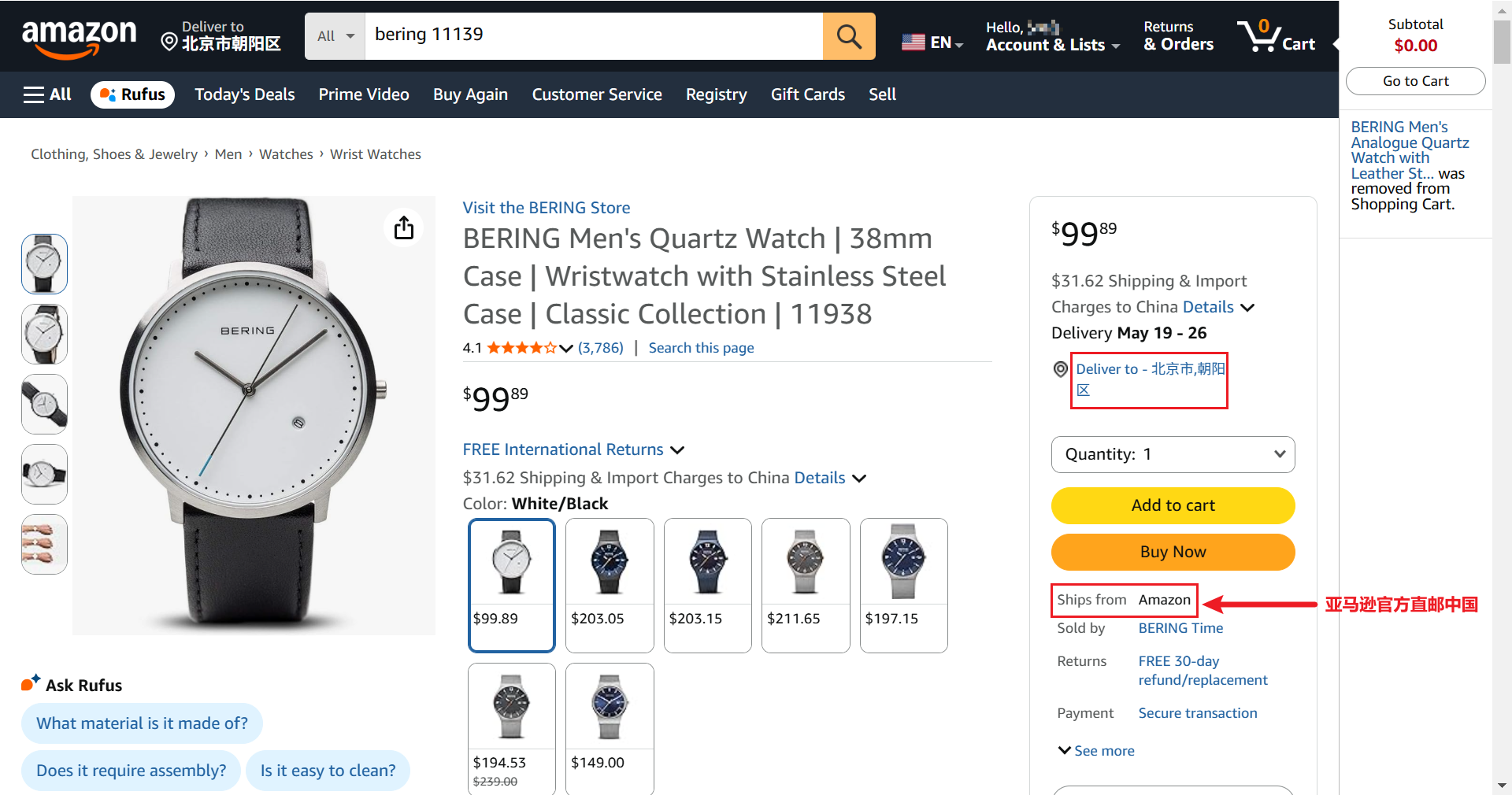
- Always select the local currency of the Amazon site you are using for payment.
- A successful payment is confirmed by receiving a debit SMS from your bank.
Viewing Your Orders
- Tap Returns & Orders in the top right corner. This page is similar to “All Orders” on JD.com.
- Tap Track Package to view shipping status.
- If you see a yellow prompt box saying “Revise payment method,” your payment failed. Check the following:
- Have you enabled “Mobile Payment,” “Online Payment” under Electronic Payment, and “Online Payment,” “Cross-Bank Auto-Debit,” “Cross-Bank Subscription” under Cross-Bank Payment in the Bank of China app? (See the section on configuring the Great Wall Cross-Border Card above.)
- Is your card balance sufficient? (The balance should be slightly more than the payment amount, about 102% of the item price, to hedge against exchange rate fluctuations.)