How to crack Windows system passwords?
How to Crack a Windows System Password?
Note: This article is not about teaching illegal activities. It’s about practical techniques.
What to Do If You Forget Your Windows Boot Password?
Let’s first look at the common scenarios when logging into a Windows system:
- Using a local account to log in
- Using a Microsoft account to log in
Whether you log in with a local account or a Microsoft account, the method to crack the Windows boot password is the same.
We can crack the Windows password either in the PE system or within the Windows system itself.
Already Logged In, But Don’t Know the Password
This falls under the scenario of cracking the current system’s password from within the system itself. In this case, we cannot modify the Windows password — we can only clear the Windows password.
Tool: Dism++ Software
- Open Dism++ software
- Click
Toolbox -> Account Management
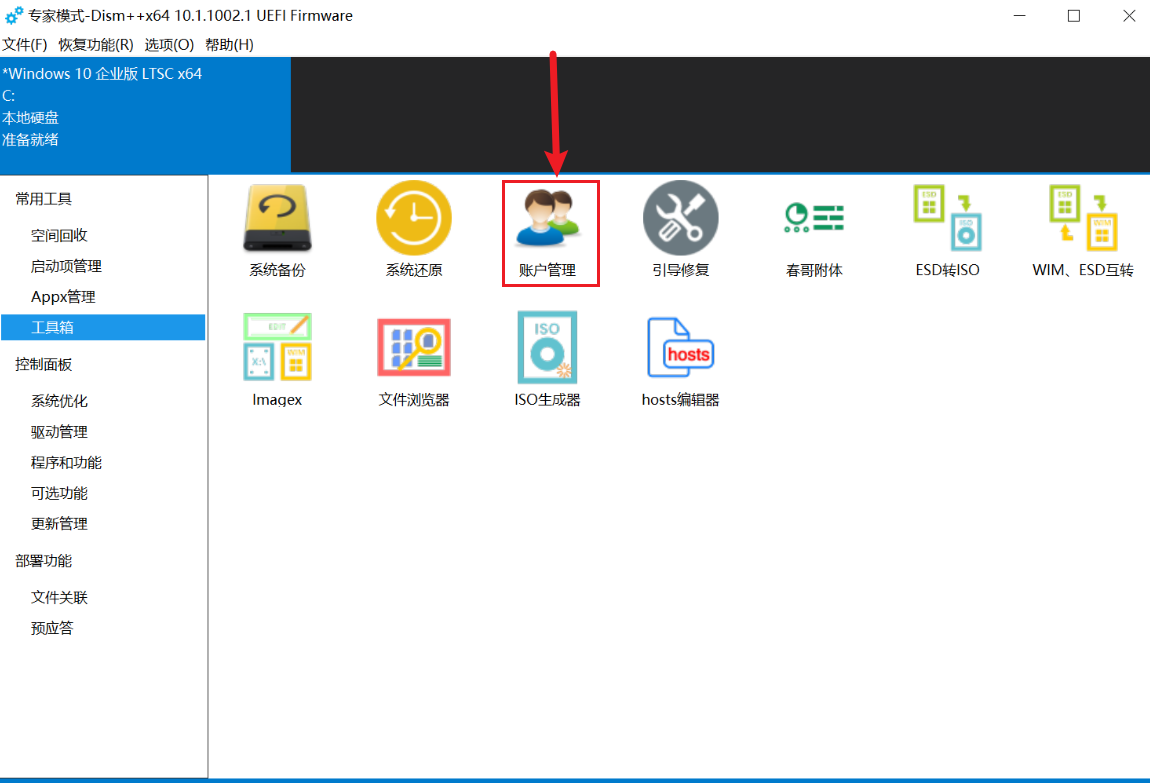
- Click on the password of the account you want to crack (can be the account currently in use)
- Click
Clear Password - Operation complete
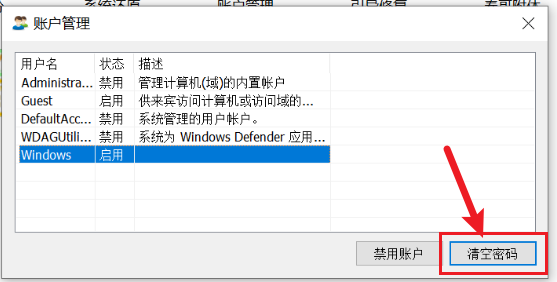
The account with the cleared password can log in directly the next time the system boots.
System Shut Down, Don’t Know the Password
We solve this using a PE system.
Tools:
- Dism++ software
- Windows Password Cracking Tool
(Either of the above two tools will work)
The operation method for Dism++ software is exactly the same as in the Windows system, so it won’t be repeated here.
Not all PE systems come with a Windows password cracking tool. My modified version of WePE by Lv Liaoliao includes this tool. Alternatively, you can download the tool directly and run it inside the PE environment.
Download the Windows Password Cracking Tool: Please reply with the word password in the backend of the official WeChat account. Do not leave comments in the section below! Do not leave comments in the section below!
Windows Password Cracking Tool Operation:
- Open the software. First, check whether the path shown above points to the system drive of the account you want to crack. If not, manually select the partition and the SAM file.
- Click
Openin the upper right corner
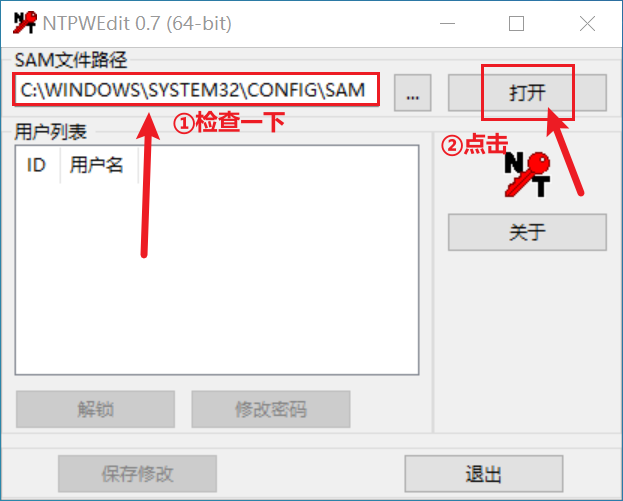
- Select the account you want to crack from the list box below
- Click
Change Passwordto modify the account’s password - If both lines for changing the password are left blank, it defaults to clearing the password.
- Confirm all the way and exit.
Why Can’t I Log In After Changing the Password?
Please note that Windows system login primarily involves passwords, PIN codes, as well as other methods like fingerprint recognition, facial recognition, and picture passwords.
However, the prerequisite for creating PIN codes, fingerprints, and facial recognition is that your Windows system must first set a password.
Therefore, when logging in, be sure to select the use password to log in option, and then enter the password you modified. Do not enter your modified password in the PIN code field.